The Iconik MCP. Connect your AI tools directly to your Iconik library
The Iconik MCP Server is now available, so tools like Claude, ChatGPT, Gemini, or any other MCP-compatible client can search your assets, read metadata, pull transcriptions, and retrieve comments without anyone exporting anything first. Every query runs under the credentials of the person using it, so an agent only ever sees and touches what that user's own account is already permissioned for — there's no separate, broader access to configure. This opens up the power of your Iconik library to the AI tools you already use, so teams can build new workflows around their media instead of working around Iconik's own interface.
The Iconik MCP is generally available to Iconik Pro and Enterprise customers on Standard and Power user tiers. You can learn how to access it here.

Real-time ingest monitoring – Review a live feed while it's still recording
With real-time ingest monitoring, you can now watch an incoming feed directly in the Iconik player while it's still being captured — annotate frames, leave comments, and flag issues in real time, layered on top of the growing-file support your team may already be using. The feed comes in through a supported capture partner (Hiscale FLICS, Telestream Vantage, and ToolsOnAir CoreI/O are all verified partner products) writing to storage that Iconik watches live, so your team knows the record is clean without anyone standing at the ingest station.
Available now for customers using a supported capture partner (e.g., Hiscale, Telestream, or ToolsOnAir.) Talk to your favorite ingest partner to get connected, or ask us for an introduction if you need one.

Filter chips: Easily see which filters are active, and adjust them without digging into the panel
Active filters when searching now show up as chips just below the search bar, instead of staying buried inside the filter panel. You can turn any chip on or off to test its effect on your results — a single click either way — and anything you change from a chip stays in sync with the filter panel, so there's one consistent view of what's active no matter where you look. It's especially useful once a search has several filters and modifiers stacked up, where the old panel-only view made it hard to tell at a glance what was actually shaping your results.

Transcriptions: easier to navigate and search
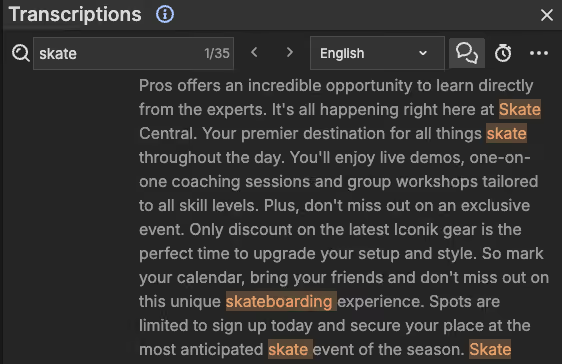
See how many results your transcript search actually returned. The transcription panel now shows how many times your search turned up in the transcript as well as your position among the total matches (e.g., 3 of 12), so you can tell at a glance how many hits there are without scrolling through the whole transcript.
Search page display options, now in one place
Zoom, files-per-page, layout, and the other display options on the Search page now live under a single dropdown with a persistent menu, so you can make several changes without it closing on you each time. It clears space on the page and keeps things simple as more display and filtering options get added down the line.

Faster downloads through the Iconik Agent via multi-part downloads
The Iconik Agent can now break a download into multiple parallel chunks on supported storage, pulling them down at once instead of one steady stream. If your team has a fast connection, this puts more of it to work on every large download; useful if you're moving big originals regularly and paying for bandwidth you aren't always able to use.
Download the latest version of the Iconik Agent to reap the benefits!

Create subclips for audio, just like you already can for video
Audio assets now support the same subclip creation already available for video — the subclip option appears in the left-side menu when you're viewing an audio asset, the same way it does for video. One note: audio subclips don't currently display waveforms.

Duplicate an automation instead of building one from scratch
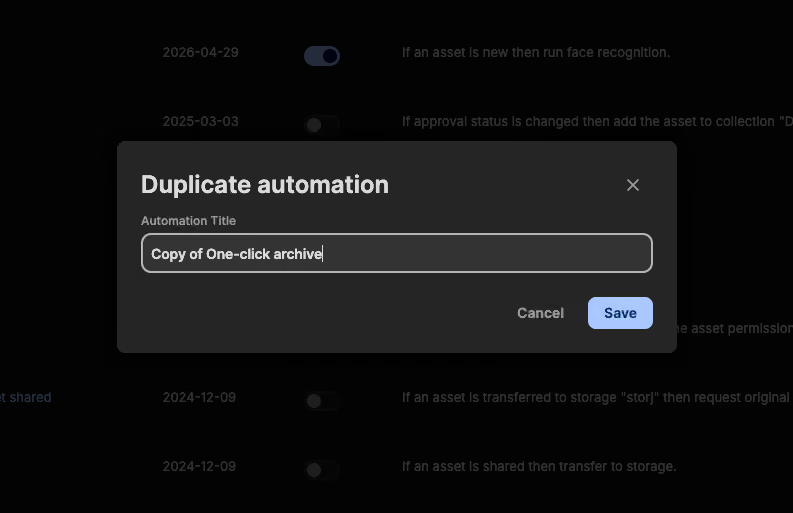
You can now duplicate an existing automation directly from the contextual menu, instead of rebuilding a similar one from scratch. That makes it easy to quickly create new automations and make the necessary changes.
Updates to sharing: Restrict by team, not just for the whole domain
Admins can now allow or deny external sharing at the team level instead of only switching it on or off for the whole domain — a team can be permitted external sharing and link sharing independent of everyone else, so trusted teams with outside partners keep the access they need while the rest of the domain stays internal-only.

